SkySutra has 9,096 stars. Part 6 is about finding one: by clicking down through facets, by typing into a single smart search bar, by opening a star's own page, and by one search box that looks through stars, constellations and nakshatras at once. Almost all of it is declarative APEX. The work is in one view that gives every star the things people ask about: is it up, how bright, what colour, which nakshatra.
How Part 6 works
| Lesson | You build | New in APEX |
|---|---|---|
| 6.1 Faceted Search | Stars (page 30): facets for up now, brightness, constellation, colour and nakshatra | Faceted Search; range facets |
| 6.2 Smart Filters | Find a Star (page 32): the same filters in one search bar | Smart Filters |
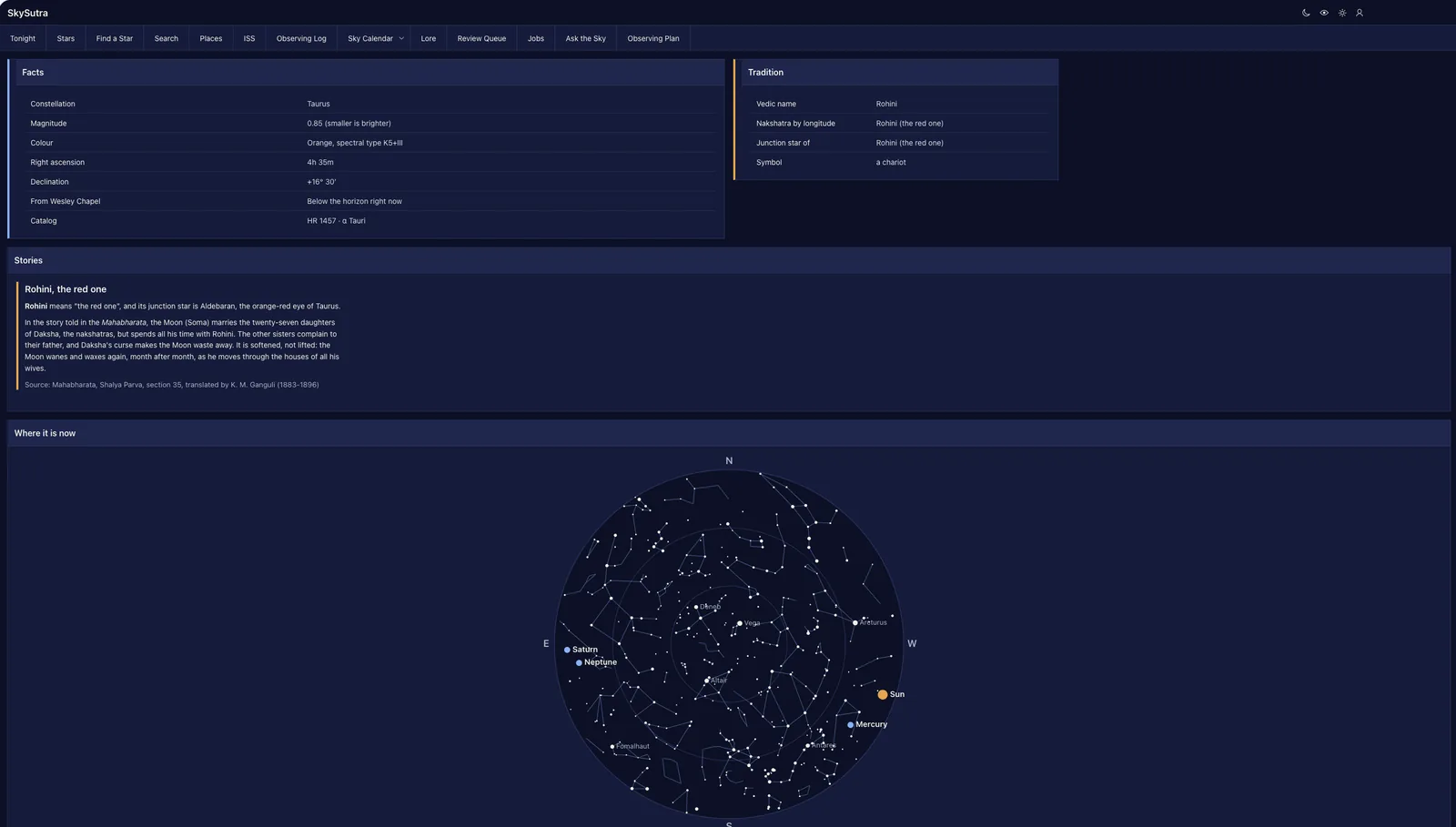
| 6.3 A star's own page | Star (page 31): facts in blue, tradition in saffron, a ring on the sky chart | Link columns; a plugin attribute that reads a page item |
| 6.4 Search everything | Search (page 33) over stars, constellations and nakshatras | Search Configurations; the Search page |
Before you start
You need Part 5 done. Download skysutra_explore.sql (the view) and the new skysutra_chart.sql, skysutra-chart.js and skysutra.css (the sky chart learns to ring one star in Lesson 6.3).
Lesson 6.1 — Faceted Search
Outcome: a page where you narrow 9,096 stars to the few you want by clicking, and see how many each click leaves.
The question. SS_STARS has a magnitude, a spectral type and a right ascension. People ask "what's bright and up right now?", "which red stars are in Orion?", "what's in Rohini?". Where do up now, red and Rohini come from?
The decision. A view, SS_STARS_V, that turns catalog numbers into the words people search with. Faceted Search counts every facet value after every click, so the view must be quick over all 9,096 rows.
| Column | From | Example |
|---|---|---|
DISPLAY_NAME |
Proper name, else Bayer name, else HR number | Aldebaran; α Tauri; HR 1 |
COLOUR |
The first of O B A F G K M in the spectral type | K5III → Orange |
NAKSHATRA |
Ecliptic longitude, moved to today, minus the ayanamsa, in 13°20′ slices | Aldebaran → Rohini |
ALTITUDE_NOW, UP_NOW |
The star's position and your home's local sidereal time | 61, Up now |
Run skysutra_explore.sql, then try it:
select display_name, colour, nakshatra, altitude_now, up_now
  from ss_stars_v
 where proper_name in ('Regulus', 'Spica', 'Antares', 'Betelgeuse');
Two things the view taught us
Trigonometry on NUMBER is slow. The first version took 1.8 seconds for the whole catalog: too slow to run on every facet click. Oracle's NUMBER keeps 38 significant digits, and its sin, cos and asin are computed in software to that precision. Converting the angles with to_binary_double hands the same functions to the processor's floating point, and the view runs in 0.08 seconds. Fifteen digits is far more than a star chart needs. Two more changes help: the one-row now_at and home CTEs are marked /*+ materialize */ so today's ayanamsa and sidereal time are worked out once, not once per star; and "up now" uses the J2000 position without precession, which can put a star up to about a degree off (Spica: 45° in the view, 44.2° with Part 3's full calculation). That's fine for "is it up?", and the star's own page uses the full calculation.
Junction stars don't always sit in their own nakshatra. Antares is the junction star (yogatara) of Jyeshtha, but its sidereal longitude, about 225.9°, falls in the slice before, Anuradha (213°20′ to 226°40′). Betelgeuse, Ardra's junction star, falls in Mrigashira. The junction stars were chosen as markers in the sky long before anyone measured longitudes to a tenth of a degree, and Lahiri's ayanamsa is a modern convention. The view says what the longitude says, and labels the facet Nakshatra (by longitude); Lesson 6.3's page also shows which nakshatra a star is the junction star of.
Build: the Stars page
- Create Page › Faceted Search. Page Number 30, Name Stars, Table / View Name
SS_STARS_V, no breadcrumb, a new navigation entry with iconfa-star-o. Next. - Display as Report. Tick UP_NOW, CONSTELLATION, BRIGHTNESS, COLOUR and NAKSHATRA. The wizard pre-ticks columns with few distinct values, including
CONSTELLATION_ABBRandSPECTRAL_TYPE: untick those. Create Page. - In Page Designer, set the facets' order and labels: Search 5; Up now? 10; Brightness 20; Constellation 30; Colour 40; Nakshatra (by longitude) 50. For Constellation and Nakshatra turn on Display Filter Initially: 88 and 27 values are too many to scroll.
Brightness as a range. BRIGHTNESS is text, so its values sort alphabetically. Better to filter the number itself: change the facet to Type Range on Database Column MAGNITUDE, Data Type Number, and give it a static list of values whose return values are ranges, low|high:
STATIC2:Brightest (under 1);|1,Bright (1 to 2);1|2,2 to 3;2|3,3 to 4: a city sky;3|4,
4 to 5: a suburban sky;4|5,5 to 6.5: a dark sky;5|6.5,Fainter: binoculars;6.5|
An empty side means "no limit". STATIC2 keeps the order as written instead of sorting it. Lower magnitude is brighter, which the labels say in words.
- In Search Results, show Star, Vedic name, Constellation, Magnitude, Colour, Spectral type, Nakshatra, Altitude now and Up now?; make the rest Hidden Column. Set Order By to Static Value
MAGNITUDE, DISPLAY_NAME, and Pagination to Row Ranges X to Y of Z, 50 rows.
Click Up now? › Up now and Brightness › Brightest: the list drops to the handful of bright stars above your home this minute, and every other facet's counts change to match.
Check yourselfWhy a range facet on MAGNITUDE rather than checkboxes on BRIGHTNESS?
The range filters the number, keeps its natural order, and needs no text column built for sorting.
Lesson 6.2 — Smart Filters
Outcome: the same filters as one search bar with chips, for small screens.
The question. Faceted Search spends a column of the screen on facets. On a phone at the telescope, that's most of the screen. Same data, less room?
The decision. Smart Filters: one search bar, with suggestion chips under it ("Up now", "Orange", "Rohini"), each opening the same kind of filter. It reads the same view and uses the same filter types.
| Faceted Search | Smart Filters | |
|---|---|---|
| Filters shown | All, always, in a side column | One bar; chips suggest the most useful values |
| Best on | Wide screens, exploring | Phones, knowing roughly what you want |
| Counts | Next to every value | In the suggestion chips |
- Create Page › Smart Filters. Page Number 32, Name Find a Star, view
SS_STARS_V, iconfa-search. - Tick the same five columns, untick the pre-ticked extras, Create Page.
- Repeat Lesson 6.1's steps 3 and 4 on the filters (they're called filters here, not facets, but have the same properties), including Brightness as a range on
MAGNITUDE.
Type ori in the bar: the suggestions offer Orion as a constellation filter and the stars whose names match. Choose Up now from the chips, then Red: the red stars above you now.
Check yourselfYou add a sixth facet to Stars. Does Find a Star get it?
No: each page has its own filters. Both read the same view, so a new column is one step on each page.
Lesson 6.3 — A star's own page
Outcome: click any star to see its facts in blue, its tradition in saffron, and where it is in your sky right now.
The question. One page for every one of 9,096 stars: how many pages do we build? (One, page 31, with the star's id in a page item.)
Build: the Star page
-
Create Page › Blank Page: 31, Star, no breadcrumb, no navigation entry (you reach it from a star, not the menu).
-
Two hidden items,
P31_IDandP31_NAME. A Computation Before Header setsP31_NAME:select coalesce(proper_name, bayer, 'HR ' || hr_number) from ss_stars where id = :P31_IDand the page Title is
&P31_NAME., so the browser tab says "Aldebaran". -
Facts: a Classic Report, Value Attribute Pairs - Row, CSS class
ss-astro, column span 6. Its query unpivots one row ofSS_STARS_Vwith alateralsubquery, as in Lesson 5.3: constellation, magnitude, colour and spectral type, right ascension in hours and minutes, declination in degrees and arcminutes, whether it's up from your home, and its catalog numbers. -
Tradition: the same, CSS class
ss-lore, column span 6, beside Facts. Vedic name, nakshatra by longitude, and, if the star is a junction star, which nakshatra, its symbol and description:select l.label, l.value from ss_stars_v v join ss_nakshatras n on n.name = v.nakshatra left join ss_nakshatras j on j.junction_star_id = v.id, lateral (select 1 seq, 'Vedic name' label, v.vedic_name value from dual union all select 2, 'Nakshatra by longitude', n.name || ' (' || n.english_name || ')' from dual union all select 3, 'Junction star of', j.name || ' (' || j.english_name || ')' from dual where j.id is not null union all select 4, 'Symbol', j.symbol from dual union all select 5, 'About ' || j.name, j.description from dual) l where v.id = :P31_ID and l.value is not null order by l.seqAntares shows both answers side by side: Nakshatra by longitude, Anuradha; Junction star of, Jyeshtha.
-
Where it is now: a Sky Chart region (Part 5's plugin).
-
On pages 30 and 32, make the Star column a Link to page 31, setting
P31_IDto#ID#and clearing page 31's cache.
The sky chart rings one star
The plugin learns one thing. ss_chart.sky_json takes a fourth argument, p_mark_star, and adds that star's position as "mark", even below the horizon. The plugin gets a second custom attribute:
| Static ID | Label | Type |
|---|---|---|
mark_item |
Star to ring | Page Item |
render_region reads it with p_region.attributes.get_varchar2('mark_item') and passes v(that item). The script draws a saffron ring and the star's name, or adds "Aldebaran is below the horizon right now" to the caption. On page 31, set Star to ring to P31_ID. The home page leaves it empty and its chart is unchanged.
A plugin attribute of type Page Item is how one plugin serves many pages: the page says which of its items to read, the plugin doesn't need to know.
Check yourselfWhy does sky_json include the marked star even when it's below the horizon?
So the page can say where it is, "below the horizon right now", instead of silently showing nothing.
Lesson 6.4 — Search everything
Outcome: one search box that finds stars, constellations and nakshatras, each result linking to the right page.
The question. Someone types "rohini". Is that a star (Aldebaran's Vedic name), a nakshatra, or both? Should they have to know which page to search?
The decision. Search Configurations: each one describes one searchable source, what to show for a hit, and where a hit links. A Search Page searches several at once and groups the results.
| Configuration | Source | Searches | Links to |
|---|---|---|---|
| Stars | SS_STARS_V |
names, Bayer, Vedic name, constellation, nakshatra | Star (31), P31_ID = &ID. |
| Constellations | SS_CONSTELLATIONS, with a star count |
name, abbreviation, Vedic name, description | Stars (30) filtered: P30_CONSTELLATION = &NAME. |
| Nakshatras | SS_NAKSHATRAS |
name, English name, symbol, description | Stars (30) filtered: P30_NAKSHATRA = &NAME. |
-
Shared Components › Search Configurations › Create. Name Stars, Search Type Standard (a plain
LIKEsearch; Part 11 adds a vector search). Source SQL Query:select id, display_name, proper_name, bayer, vedic_name, constellation, nakshatra, 'Magnitude ' || to_char(magnitude, 'fm990.00') || ' · ' || colour || ' · ' || constellation as details from ss_stars_vPrimary Key ID, Title DISPLAY_NAME, Description DETAILS, Icon static
fa-star. Create. -
Edit it: Subtitle VEDIC_NAME; Link Redirect to Page 31,
P31_ID=&ID.; Maximum Results 25. -
The same for Constellations (icon
fa-object-group) and Nakshatras (iconfa-moon-o). Their links go to the Stars page with a facet already set: a facet is a page item, soP30_CONSTELLATIONin the URL selects that constellation, and the clear-cache valueRP,30resets the other facets first. -
Create Page › Search Page: 33, Search, icon
fa-binoculars, tick all three configurations.
Search for rohini: under Stars, Aldebaran (its Vedic name is Rohini); under Nakshatras, Rohini, "the red one". Search for orion: the constellation, which opens Stars filtered to Orion's 225 stars; and under Stars, Orion's stars themselves (the first 25), because the constellation is one of the searched columns.
Parts 8 and 9 add Observations and Lore as two more configurations; the Search page shows them with one tick each.
Check yourselfWhy do the Constellations results link to the Stars page instead of a Constellation page?
The faceted page already shows a constellation's stars when its facet is set; a link that sets the facet reuses it.
Checkpoint
Every star is now findable four ways: clicking facets, a search bar, a link from anywhere, and one search over the whole sky.
Test it
select count(*) from ss_stars_vreturns 9,096 in well under a second.- Stars: Up now? › Up now, then Brightness › Brightest: the bright stars above you; the counts on every facet change with each click.
- Find a Star: chips, a range for brightness, and the same results as Stars for the same choices.
- Click Antares: Facts in a blue-edged card, Tradition in a saffron one (Anuradha by longitude, junction star of Jyeshtha), and a saffron ring on the chart if it's up.
- Search
rohiniandorion: grouped results, each linking to the right page.
Files
| File | Used in |
|---|---|
skysutra_explore.sql |
6.1 (SS_STARS_V) |
skysutra_chart.sql, skysutra-chart.js, skysutra.css |
6.3 (the ringed star) |
Exercises
- Add a facet for stars visible tonight (up at any time while it's dark), using
dark_begins_atanddark_ends_atfromSS_RISE_SET. - Show the Stars page as Cards instead of a report, with the colour as the card's accent.
- On page 31, list the other stars in the same constellation figure (
SS_CONSTELLATION_LINES), each linking to its own page. - Stretch: make "up now" exact by adding precession to the view, and measure what it costs.
Review questions
Try each one before you open it. The graded quiz is at the end of the page.
1Why does SS_STARS_V exist rather than querying SS_STARS on each page?
It turns numbers into searchable words, once, for every page and search that needs them
2What made the view 20 times faster?
BINARY_DOUBLE trigonometry instead of NUMBER, and materializing the one-row CTEs
3Why can a junction star fall outside its own nakshatra?
The markers are traditional; the slices are measured longitudes with a modern ayanamsa
4How is a range facet's static value written?
low|high, with an empty side meaning no limit
5What does STATIC2 do in a static list of values?
Keeps the order as written
6When would you choose Smart Filters over Faceted Search?
Small screens, or when people know roughly what they want
7How does one page show any of 9,096 stars?
The star's id in a page item, P31_ID, set by the link
8How does the Sky Chart know which star to ring?
A plugin attribute of type Page Item, read with p_region.attributes
9What does a Search Configuration define?
A source, what a hit shows, and where it links
10How do you open the Stars page already filtered to Orion?
Link with P30_CONSTELLATION=Orion and clear cache RP,30
Downloads for Part 6
Everything this part uses. The SQL files are plain text: open one in any editor before you run it.
- Part 6 kitskysutra-part-6.zipEvery file above in one zip, with a README
- Exploringskysutra_explore.sqlLesson 6.1: SS_STARS_V
- Sky chartskysutra_chart.sqlLesson 6.3: the ringed star
- Sky chart drawingskysutra-chart.jsLesson 6.3
- Shared stylesskysutra.cssLesson 6.3
Part 6 quiz
5 questions. Get 4 right to pass. You can retake it as often as you like.