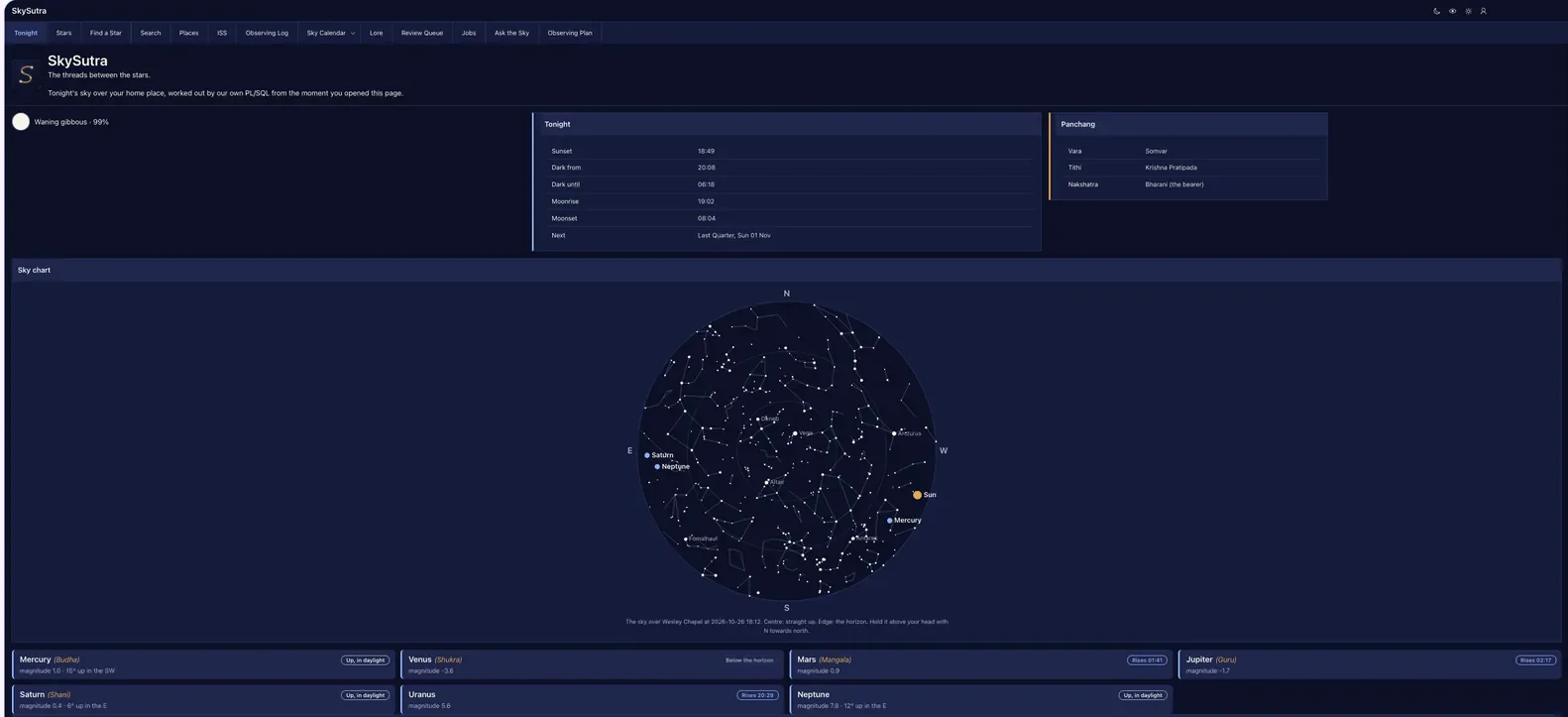
Parts 1 to 4 built the sky as data. Part 5 puts it on screen: an app that opens dark, three small components you write once and reuse everywhere, a card for today's Moon and panchang, a chart of the sky above your home, and the Tonight page that joins them. You finish with a home page that answers the first question anyone asks of a sky app: what can I see right now?
How Part 5 works
| Lesson | You build | New in APEX |
|---|---|---|
| 5.1 Dark first | Night, Night Vision and Day theme styles; a switch that remembers each person's choice | Theme styles with your own CSS; apex_theme.set_session_style |
| 5.2 Template Components | Sky Pill, Moon Badge, Planet Card | Template component plugins; one component inside another |
| 5.3 Today in the sky | The Moon, Tonight and Panchang cards | SS_TODAY_V; Value Attribute Pairs |
| 5.4 The sky chart | A region plugin that draws the sky as SVG | Region plugins; a render procedure in a package |
| 5.5 The Tonight page | Planet cards that know whether each planet is up, in daylight, in the Sun's glare, or rising later | SS_TONIGHT_PLANETS_V |
Before you start
You need Part 4 done, and SS_RISE_SET filled for your home place for today (Lesson 3.5: ss_almanac.refresh(<your place id>)). Download:
| File | What it is |
|---|---|
skysutra-night.css, skysutra-night-vision.css, skysutra-day.css |
The three styles' colors |
skysutra.css |
Maps the colors onto Universal Theme, plus the components' styles |
skysutra-chart.js |
Draws the sky chart |
skysutra_auth.sql |
Lesson 5.1 adds ss_auth.apply_theme and set_theme |
skysutra_tonight.sql |
Lessons 5.3 and 5.5: two views |
skysutra_chart.sql |
Lesson 5.4: SS_CHART |
Lesson 5.1 — Dark first
Outcome: an app that opens dark, can turn red for the eyepiece, and remembers which one each person likes.
The question. Part 0 picked Vita - Dark. Why isn't that enough?
The decision. People use SkySutra outside at night. A white page ruins half an hour of dark adaptation; even a dark blue one dims it. Astronomers use red light, because the eye's rods barely see red. So SkySutra has three looks:
| Style | When | Background | Text |
|---|---|---|---|
| Night (the default) | Indoors in the evening, planning | Midnight #0B1026 |
Starlight #F5F3EA |
| Night Vision | Outside, at the eyepiece | Near-black #0A0000 |
Red #E8473A; pictures turned red too |
| Day | Daylight, printing | Paper #F7F5EF |
Midnight #141B3C |
Each style is Vita (dark or light) plus two of our files: one that sets SkySutra's colors as CSS variables (--ss-bg, --ss-text, --ss-astro …), and skysutra.css, shared by all three, which hands those colors to Universal Theme's own variables (--ut-body-background-color: var(--ss-bg) and so on). Every region, report, button and menu then takes the brand with no CSS on any page. Two colors carry meaning everywhere: blue (--ss-astro) for measured astronomy, saffron (--ss-lore) for tradition.
Build: the three styles
-
Shared Components › Static Application Files › Create File, and upload the four CSS files into a
cssdirectory. APEX makes a.min.csscopy of each when you save. -
Shared Components › Themes › Universal Theme - 42 › Theme Styles › Create:
Name Base Style File URLs Night Vita - Dark #THEME_FILES#css/Vita-Dark#MIN#.css?v=#APEX_VERSION##APP_FILES#css/skysutra-night#MIN#.css#APP_FILES#css/skysutra#MIN#.cssNight Vision Vita - Dark the same, with skysutra-night-visionDay Vita #THEME_FILES#css/Vita#MIN#.css?v=#APEX_VERSION#, thenskysutra-day, thenskysutraThe order matters: Vita first, our colors second, the mapping last.
-
On the theme, set Current Theme Style to Night. Sign out: the sign-in page is now midnight blue with a saffron focus ring.
Build: remembering the choice
SS_USERS.THEME (Part 1) holds NIGHT, NIGHT_VISION or DAY. Run the new skysutra_auth.sql. It adds:
procedure apply_theme;               -- read ss_users.theme, set this session's style
procedure set_theme (p_theme varchar2);  -- save a new choice, then apply it
apply_theme calls apex_theme.set_session_style(p_theme_number => 42, p_name => 'Night Vision'), and both post-authentication procedures now call it, so the style follows you to every device you sign in on.
set_theme looks the person's id up before its update:
procedure set_theme (p_theme varchar2) is
    l_user_id ss_users.id%type := current_user_id;
begin
    update ss_users set theme = p_theme where id = l_user_id;
    apply_theme;
end set_theme;
The first version wrote where id = current_user_id straight in the update, and the first click on Day failed with ORA-04091: table WKSP_BHAARATH.SS_USERS is mutating, trigger/function may not see it. current_user_id is a function that reads SS_USERS; called from the WHERE clause of a statement that is changing SS_USERS, Oracle refuses, because the function could see the table half-updated. A function that reads a table can sit in a query on that table, but not in an insert, update or delete on it: call it first and keep the answer in a variable.
The switch:
- Shared Components › Application Processes › Create: Switch theme style, Before Header, code
ss_auth.set_theme(substr(:REQUEST, 7));, condition Request is contained in ValueTHEME_NIGHT,THEME_NIGHT_VISION,THEME_DAY. - Shared Components › Navigation Bar List, three entries before the
&APP_USER.menu: Night (fa-moon-o), Night Vision (fa-eye) and Day (fa-sun-o), each with the target URLf?p=&APP_ID.:&APP_PAGE_ID.:&SESSION.:THEME_NIGHT(andTHEME_NIGHT_VISION,THEME_DAY). Set each one's List Item CSS Classes (attribute 2) toicon-only, and give it atitleandaria-labelin Link Attributes (title="Night theme" aria-label="Night theme").skysutra.csshides the text oficon-onlyentries visually but keeps it for screen readers, so the top bar shows three small icons, one click each, and hovering shows the name.
Clicking Night Vision reloads the same page with the request THEME_NIGHT_VISION; the process strips THEME_ and saves NIGHT_VISION.
Check yourselfWhy save the choice in SS_USERS and not in a browser cookie?
So it follows the person to their phone at the telescope, not just the laptop where they chose it.
Lesson 5.2 — Template Components
Outcome: three small pieces of HTML, each written once and reused on every page that needs it.
The question. The planets report from Part 3 is a table. A table of five rows and six columns is hard to read on a phone at night. How do we show each planet as a card, the same way on every page?
The decision. A template component: a plugin whose body is an HTML template with placeholders. APEX turns each placeholder into an attribute you map to a column. It can render one row (Partial) or many (Report), and one template component can use another.
| Component | Shows | Used by |
|---|---|---|
| Sky Pill | Whether something is up: Up now, Up, in daylight, In the Sun's glare, Rises 20:37, Below the horizon | Planet Card; later the ISS and stars |
| Moon Badge | A disc lit to the right share, the phase name and percent | Today in the sky; the calendar in Part 7 |
| Planet Card | Name, Vedic name, a Sky Pill, magnitude and where to look | The Tonight page; planet pages in Part 6 |
Build: Sky Pill
Shared Components › Plug-ins › Create › From Scratch: Name Sky Pill, Internal Name SKYSUTRA.SKY_PILL, Type Template Component, Available as Single (Partial). Partial template:
{case STATE/}
  {when UP/}<span class="ss-pill ss-pill--up">Up now</span>
  {when DAY/}<span class="ss-pill ss-pill--day">Up, in daylight</span>
  {when GLARE/}<span class="ss-pill ss-pill--glare">In the Sun's glare</span>
  {when LATER/}<span class="ss-pill ss-pill--later">Rises #TIME#</span>
  {otherwise/}<span class="ss-pill ss-pill--down">Below the horizon</span>
{endcase/}
Create Plug-in. Under Custom Attributes APEX has already made STATE and TIME from the placeholders (Synchronize from Templates does it again after an edit). The look lives in skysutra.css: the up pill is filled blue, glare is outlined saffron, the rest are outlines.
Build: Moon Badge
Internal name SKYSUTRA.MOON_BADGE, Partial:
<span class="ss-moon-badge" title="#PHASE#, #LIT_PCT#% lit">
<span class="ss-moon-disc{if ?WANING/} ss-moon-disc--waning{endif/}" style="--lit:#LIT_PCT#%"></span>
<span class="ss-moon-label">#PHASE# · #LIT_PCT#%</span>
</span>
The disc is one CSS gradient: lit from the right up to --lit, and mirrored when waning. {if ?WANING/} tests whether WANING has a value, so the column must be null when the Moon is waxing; 'N' would count as true.
Build: Planet Card
Internal name SKYSUTRA.PLANET_CARD, available as Partial and Report. Partial template:
<div class="ss-planet ss-astro">
<div class="ss-planet-head">
<span class="ss-planet-name">#NAME#</span>{if ?VEDIC_NAME/} <span class="ss-vedic-name">(#VEDIC_NAME#)</span>{endif/}
{with/}
STATE:=#STATE#
TIME:=#RISES#
{apply SKYSUTRA.SKY_PILL/}
</div>
<div class="ss-planet-facts">magnitude #MAGNITUDE#{if ?DIRECTION/} · #ALTITUDE#° up in the #DIRECTION#{endif/}</div>
</div>
{with/} … {apply SKYSUTRA.SKY_PILL/} renders the Sky Pill inside the card, passing it this card's values. Report body <div class="ss-planets">#APEX$ROWS#</div>; report row:
<div class="ss-planet-row" data-id="#APEX$ROW_IDENTIFICATION#">#APEX$PARTIAL#</div>
APEX refuses a report row without #APEX$ROW_IDENTIFICATION#. The Vedic name is in saffron (ss-vedic-name) and the card has a blue edge (ss-astro): one card, both traditions, never mixed up.
Check yourselfWhere do you change the wording "Up now" so it changes on every page?
In the Sky Pill's template, once.
Lesson 5.3 — Today in the sky
Outcome: three cards at the top of the home page: the Moon, tonight's times, and the panchang.
The question. The values come from four packages and two tables (SS_SUN_MOON, SS_VEDIC, SS_RISE_SET, SS_MOON_PHASES). Should each region call them itself?
The decision. One view, SS_TODAY_V, with one row for the signed-in person's home place: the Moon's phase and lit share, WANING ('Y' or null), tithi, nakshatra, vara, sunrise and sunset, when full darkness starts and ends, moonrise and moonset, and the next principal phase. Each region is then a one-line query, and the view can be checked in SQL Commands, where ss_auth.current_user_id is you.
Run skysutra_tonight.sql, then:
select * from ss_today_v;
On our run, at Wesley Chapel on Saturday, October 24, 2026, at 10:30 local time: Waxing gibbous, 97% lit; Shukla Chaturdashi; Uttara Bhadrapada; Shanivar; sunset 18:51; dark from 20:09 until 06:17; next phase Full Moon on Monday the 26th. Astropy agrees: 96.7% lit, and the Moon's sidereal longitude puts it in the 26th nakshatra.
One detail in the view: to join today's Sun row and today's Moon row from SS_RISE_SET, the first try was left join ss_rise_set sun on … and sun.body_id = (select id from ss_bodies where code = 'SUN'), and Oracle said ORA-01799: a column may not be outer-joined to a subquery. The view joins SS_BODIES into a small rs subquery first, then outer-joins that by code.
Build: the three cards
On page 1:
-
The Moon: region type Moon Badge, source
select place_id, lit_pct, phase, waning from ss_today_v. Map Lit Pct, Phase and Waning to their columns. Column span 4. -
Tonight: a Classic Report, Start New Row off, column span 4, CSS class
ss-astro, template Value Attribute Pairs - Row:select l.label, l.value from ss_today_v t, lateral (select 1 seq, 'Sunset' label, t.sunset value from dual union all select 2, 'Dark from', t.dark_from from dual union all select 3, 'Dark until', t.dark_until from dual union all select 4, 'Moonrise', t.moonrise from dual union all select 5, 'Moonset', t.moonset from dual union all select 6, 'Next', t.next_phase from dual) l order by l.seqThe report template shows the first column as a label and the second as its value. Set Pagination › Type to No Pagination (Show All Rows): six rows don't need next and previous links. Turn off Sortable on both columns, or APEX objects that the query already has an
ORDER BY. -
Panchang: the same, with CSS class
ss-lore, for Vara, Tithi and Nakshatra.
Blue edge for what a telescope can check, saffron for the calendar of tradition.
Check yourselfWhy is WANING 'Y' or null and not 'Y' or 'N'?
Template directives test whether a value is present; 'N' would be present, so every Moon would draw as waning.
Lesson 5.4 — The sky chart
Outcome: a region plugin that draws the sky above your home, right now, as an SVG that stays sharp however far you zoom.
The question. No built-in region draws a star chart. Should the page call a JavaScript library and fetch the stars over REST?
The decision. A small region plugin of our own. The database already knows where every star and planet is (Parts 2 and 3), so the plugin's PL/SQL works out the positions and writes them into the page; 80 lines of JavaScript draw them. No library, no extra round trip, nothing to keep up to date.
| Job | Where |
|---|---|
| Which stars, lines and bodies are above the horizon, and where | ss_chart.sky_json, PL/SQL |
Putting an empty <svg> and that JSON in the page |
ss_chart.render_region, the plugin's render procedure |
| Drawing | skysutra.skyChart, in skysutra-chart.js |
The data
Run skysutra_chart.sql. ss_chart.sky_json(place, moment, faintest magnitude) returns:
{ "at": "2026-10-24T21:00", "place": "Wesley Chapel",
  "stars":  [[50.2, 297.8, 0.03, "Vega"], [14.7, 175.5, 1.74, null], ...],
  "lines":  [[alt1, az1, alt2, az2], ...],
  "bodies": [{"code":"MOON","name":"Moon","alt":41,"az":102.3}, ...] }
Each star is precessed and turned to altitude and azimuth once (Part 3's ss_coord.precess and to_horizon), and kept in a PL/SQL table by star id so the constellation lines can look their ends up without computing them twice. Stars on a figure are included even when they're fainter than the limit, so no figure is missing a corner. Only stars brighter than 1.6 carry a name.
For Wesley Chapel at 9 p.m. on October 24: 407 stars, 368 line segments, and the Moon, Saturn, Uranus and Neptune above the horizon, in 0.9 seconds. Astropy gives the same places to a tenth of a degree: Vega 50.2° up at azimuth 297.8°, the Moon at 41.0° and 102.3°, Saturn at 40.2° and 114.7° (we say 114.8°).
apex_json.write has a trap for arrays. The first try wrote each star's name with apex_json.write(name, true), meaning "write it even when null", and the JSON came out as "Vega":true: with two arguments APEX chose the overload that writes a named boolean. The fix is a one-argument call with a variable: apex_json.write(l_name), which writes null for a null name.
The plugin
- Upload
skysutra-chart.jsinto ajsdirectory of Static Application Files. - Plug-ins › Create › From Scratch: Name Sky Chart, Internal Name
SKYSUTRA.SKY_CHART, Type Region, API Interface Procedure, Render Procedure/Function Namess_chart.render_region. Create Plug-in. - File URLs to Load › JavaScript
#APP_FILES#js/skysutra-chart#MIN#.js. Apply Changes. - Custom Attributes › Add Attribute: Static ID
mag_limit, Label Faintest star (magnitude), Type Number, Required on, Default 4.5.
The render procedure lives in the package, not in the plugin's PL/SQL Code box. Compiled code gets checked when you compile it, can be tested from SQL Commands, and shows up in Git diffs; a plugin only needs its name.
procedure render_region (p_plugin in            apex_plugin.t_plugin,
                         p_region in            apex_plugin.t_region,
                         p_param  in            apex_plugin.t_region_render_param,
                         p_result in out nocopy apex_plugin.t_region_render_result) is
    l_id    varchar2(255) := apex_escape.html_attribute(p_region.static_id);
    l_limit number := nvl(p_region.attributes.get_number('mag_limit'), 4.5);
    ...
begin
    select home_place_id into l_place_id from ss_users where id = ss_auth.current_user_id;
    l_json := sky_json(l_place_id, systimestamp, l_limit);
    sys.htp.p('<div class="ss-chart" id="' || l_id || '_chart"><svg ...></svg>'
           || '<div class="ss-chart-caption"></div><script type="application/json">');
    -- the JSON, 8,000 characters at a time
    sys.htp.p('</script></div>');
    apex_javascript.add_onload_code('skysutra.skyChart("' || l_id || '");');
end;
The JSON goes in a <script type="application/json"> block: the browser doesn't run it, it has no size limit (inline JavaScript strings do), and the drawing code reads it with JSON.parse.
The drawing
The chart is the sky as you see it lying on your back: the zenith in the middle, the horizon as the circle, north at the top and east on the left. A map of the sky overhead is a mirror image of a map of the ground below, which is why every planisphere has east and west "the wrong way round". An object at altitude alt and azimuth az goes at
r = (90 − alt) / 90 × R x = centre − r·sin(az) y = centre − r·cos(az)
SVG, not a picture. The first version drew on a <canvas>, which is a bitmap: zoom in on a phone and the stars go soft. SVG is drawing instructions, so the browser redraws it sharp at any zoom, and every star is an element you could later click. The script builds the SVG in a fixed 1000 × 1000 coordinate system (viewBox="0 0 1000 1000") and CSS makes it as wide as the region, up to 720 px. About 400 stars, one path for all the constellation lines, and a dozen labels: small enough for any phone.
Brighter stars get bigger dots; planets are blue, the Sun saffron, the Moon starlight. The colors are CSS classes in skysutra.css (.sc-stars { fill: var(--ss-star); } and so on), not values in the script, so the chart turns red in Night Vision with no extra code. Hover over a planet for its altitude.
On page 1, add a region of type Sky Chart, Sky chart, Static ID sky.
Check yourselfWhy does the chart put east on the left?
It's a view looking up; seen from below, east and west swap places compared with a map looking down.
Lesson 5.5 — The Tonight page
Outcome: planet cards that say, for each planet, whether you can see it now, and if not, why not or when.
The question. A planet above the horizon isn't always visible. What states does a planet card need?
The decision. Five, worked out in a view, SS_TONIGHT_PLANETS_V, in this order:
| State | Rule | Pill |
|---|---|---|
GLARE |
Above the horizon, within 15° of the Sun | In the Sun's glare |
DAY |
Above the horizon while the Sun is up | Up, in daylight |
UP |
Above the horizon, Sun down | Up now |
LATER |
Below the horizon, rising within 12 hours | Rises 20:37 |
DOWN |
Anything else | Below the horizon |
"Rises" is the next rise_at after now in SS_RISE_SET; "Sun is up" means now falls between a Sun row's rise and set.
DAY wasn't in the first version. Checking the page at 10:30 in the morning, it said Jupiter, Mars and Mercury were "Up now": true, and useless. The fix was one more line in the view's case and one more {when DAY/} in the Sky Pill. Test a sky app at noon as well as at midnight.
Saturday morning, October 24, 2026, at Wesley Chapel:
| Planet | State | Why |
|---|---|---|
| Venus | GLARE | 6.5° from the Sun: inferior conjunction is this week |
| Jupiter, Mars, Mercury | DAY | Up, but so is the Sun |
| Saturn, Uranus, Neptune | LATER | Rising at 17:50, 20:37 and 17:24 |
Build: planet cards
Change page 1's Planets region (from Part 3) to type Planet Card, Display Report, and the source to:
select id, name, vedic_name, magnitude, altitude, direction, state, rises,
       case code when 'MERCURY' then 1 when 'VENUS' then 2 when 'MARS' then 3 when 'JUPITER' then 4
                 when 'SATURN' then 5 when 'URANUS' then 6 else 7 end as from_the_sun
  from ss_tonight_planets_v
A template component region won't take an ORDER BY in its query ("ORDER BY clause is not supported, use Region Order By instead"). Set Order By › Type to Static Value and the clause to FROM_THE_SUN.
Map each attribute to its column, and set the ID column's Primary Key on, for #APEX$ROW_IDENTIFICATION#. When No Data Found: "Set a home place to see tonight's planets."
The planets keep their order from the Sun, and skysutra.css lays the cards out four to a row (two on a phone): Mercury, Venus, Mars and Jupiter, then Saturn, Uranus and Neptune. Each card's pill says what you can see, so the order doesn't have to; and a planet is always in the same place, which matters more to someone glancing at the page every night.
The home page now reads, top to bottom: the Moon, Tonight, Panchang; the sky chart; the planets; bright stars up now (Part 2); and Live (Part 4).
Two finishing touches for the reports from earlier parts. Bright stars up now and Live each have a row to themselves, so in Attributes › Appearance › Template Options turn on Stretch Report (t-Report--stretch) to fill the width, and set both to No Pagination (Show All Rows): a handful of rows has no second page.
Check yourselfVenus is 32° up at noon. Why does its card say "In the Sun's glare" and not "Up, in daylight"?
GLARE is checked first: 6.5° from the Sun, it is lost in the Sun's light whatever the time.
Checkpoint
The home page is now the Tonight page: dark by default, red at the eyepiece, light by day, and honest about what can actually be seen.
Test it
- Sign in: the page is midnight blue. The top bar has three icons, Night, Night Vision and Day; Night Vision turns everything red, including the sky chart and the logo. Sign out and in again: your choice stays.
select * from ss_today_vreturns one row with every column filled.select name, state, rises from ss_tonight_planets_vreturns seven rows.- The sky chart shows the horizon circle, N at the top and E on the left, constellation figures, and named bright stars.
- Every planet card has a pill; the cards run in order from the Sun, four to a row.
Files
| File | Used in |
|---|---|
skysutra-night.css, skysutra-night-vision.css, skysutra-day.css, skysutra.css |
5.1, 5.2 |
skysutra_auth.sql |
5.1 (apply_theme, set_theme) |
skysutra_tonight.sql |
5.3, 5.5 (SS_TODAY_V, SS_TONIGHT_PLANETS_V) |
skysutra_chart.sql, skysutra-chart.js |
5.4 (SS_CHART, the drawing) |
Exercises
- Give the Sky Chart plugin a second attribute, Show constellation figures (Yes/No), and skip the lines when it's off.
- Add the ISS's next pass to the Tonight card from
SS_ISS_PASSES, with a Sky Pill showingLATERand its start time. - Draw the Moon on the chart as a disc lit to the right share, reusing the Moon Badge's idea in SVG.
- Stretch: let the chart take a time from a page item (
P1_AT) and add a slider for the next six hours.
Review questions
Try each one before you open it. The graded quiz is at the end of the page.
1Why three theme styles and not one dark one?
Night for planning, Night Vision keeps dark adaptation at the eyepiece, Day for daylight and printing
2In what order do a style's CSS files load, and why?
Vita, then our colors, then the mapping, so each can use what came before
3Where is a person's style kept, and what applies it at sign-in?
SS_USERS.THEME; ss_auth.apply_theme, called from post-authentication
4Why does set_theme put current_user_id in a variable before its update?
The function reads SS_USERS; called inside an update of SS_USERS it raises ORA-04091, mutating table
5What's the difference between a template component's Partial and Report?
One row, or many rows each rendered with the partial
6How does Planet Card show a Sky Pill?
{with/} sets STATE and TIME, {apply SKYSUTRA.SKY_PILL/} renders it
7Why is WANING null rather than 'N' when the Moon is waxing?
{if ?WANING/} is true for any value
8Why does SS_TODAY_V exist instead of three queries?
One place for the logic, testable in SQL Commands, one-line regions
9Why does the Sky Chart write its data in a script type="application/json" block?
Not executed, no size limit, read with JSON.parse
10Why keep the render procedure in a package?
Compiled and checked, testable, visible in Git; the plugin only names it
11What made the DAY state necessary?
At noon, planets above the horizon were shown as "Up now" though nobody can see them
Downloads for Part 5
Everything this part uses. The SQL files are plain text: open one in any editor before you run it.
- Part 5 kitskysutra-part-5.zipEvery file above in one zip, with a README
- Night styleskysutra-night.cssLesson 5.1
- Night Vision styleskysutra-night-vision.cssLesson 5.1
- Day styleskysutra-day.cssLesson 5.1
- Shared stylesskysutra.cssLessons 5.1 and 5.2: maps the colours onto Universal Theme
- Sign-in, updatedskysutra_auth.sqlLesson 5.1: apply_theme and set_theme
- Tonightskysutra_tonight.sqlLessons 5.3 and 5.5: SS_TODAY_V and SS_TONIGHT_PLANETS_V
- Sky chartskysutra_chart.sqlLesson 5.4: SS_CHART, the plugin's render procedure
- Sky chart drawingskysutra-chart.jsLesson 5.4: draws the chart
Part 5 quiz
5 questions. Get 4 right to pass. You can retake it as often as you like.