SkySutra works for the people signed in to it. Part 12 takes it out into the world. Other programs get the community's observations as JSON, through an API that can't change anything and doesn't give away where anyone lives. Tonight's plan becomes a PDF you can print and take outside. The app goes on your phone's home screen. And the last lesson asks what changes when real people start logging real observations.
How Part 12 works
| Lesson | You build | New in APEX |
|---|---|---|
| 12.1 JSON Relational Duality views | SS_PUBLIC_OBSERVATIONS_DV: an observation, its photos and comments as one document |
Duality views |
| 12.2 A public API from a view | Module skysutra.v1: observations, photos and the sky calendar, read-only |
REST from a duality view; a media handler |
| 12.3 A printable observing plan | Observing Plan (page 90) and its Download PDF | APEX_DATA_EXPORT to PDF |
| 12.4 On your phone | SkySutra installable, with its name and colours | PWA installability |
| 12.5 Go-live | A checklist, and the Advisor's findings | Advisor |
Before you start
You need Part 11 done. Download and run skysutra_share.sql in SQL Commands (or SQL Scripts). It makes:
- the duality view
SS_PUBLIC_OBSERVATIONS_DV - the view
SS_API_EVENTS_V - the REST module
skysutra.v1 - package
SS_PLANand the viewSS_OBSERVING_PLAN_V
It's safe to run again.
Lesson 12.1 — JSON Relational Duality views
Outcome: each published public observation as one JSON document, with the data still in its tables.
The question. An observation is spread over five tables: the observation itself, its photos, its comments, the observer, the place, and whatever was looked at (a star, a planet or a constellation). A program that wants "observation 44" doesn't want to make six queries. Should SkySutra store a JSON copy?
The answer. No. A copy goes stale, and then there are two truths. A JSON Relational Duality view shows the tables as documents: one row per observation, one JSON object per row, built from the tables each time it's read.
create or replace json relational duality view ss_public_observations_dv as
select json {
         '_id'          : o.id,
         'observedAt'   : o.observed_at,
         'notes'        : o.notes,
         ...
         'observer'     : (select json {'userId' : u.id, 'name' : u.display_name}
                             from ss_users u with noinsert noupdate nodelete
                            where u.id = o.user_id),
         'body'         : (select json {'bodyId' : b.id, 'name' : b.name, 'vedicName' : b.vedic_name}
                             from ss_bodies b with noinsert noupdate nodelete
                            where b.id = o.body_id),
         'photos'       : [ select json {'photoId' : ph.id, 'caption' : ph.caption,
                                         'mimeType' : ph.mime_type}
                              from ss_observation_photos ph with noinsert noupdate nodelete
                             where ph.observation_id = o.id ],
         'comments'     : [ ... ]
       }
  from ss_observations o with noinsert noupdate nodelete
 where o.status = 'PUBLISHED' and o.visibility = 'PUBLIC'
  with check option;
How to read it:
{ ... }makes an object, and[ select ... ]makes an array: one entry for each photo.- A subquery that joins on a foreign key nests the row it finds: the observer, the place, the body. When there's no row (an observation of a planet has no star), the field is an empty object
{}. _idis the document's key. Every duality view needs one, from the root table's primary key.WITH NOINSERT NOUPDATE NODELETEon every table makes the view read-only. Duality views can also be written to: send a changed document back and Oracle updates the tables underneath. SkySutra's rule is that observations change only throughSS_OBS_API(MODEL.md), so this view only shows them.WHERE ... WITH CHECK OPTION. A duality view may filter its root table, but only withWITH CHECK OPTION; without it you get ORA-42664. This one shows only published public observations, so nothing else can leak through it.
Here is observation 44, as SQL Commands shows it:
{
  "_id" : 44,
  "observedAt" : "2026-10-24T22:17:00.000000-04:00",
  "publishedAt" : "2026-10-25T02:21:29.852872Z",
  "instrument" : "My bigass telescope",
  "notes" : "Yo yo look at Jup..",
  "observer" : { "userId" : 61, "name" : "neelesh shah" },
  "body" : { "bodyId" : 5, "name" : "Jupiter", "vedicName" : "Guru" },
  "star" : { },
  "place" : { "placeId" : 61, "name" : "Wesley Chapel", "bortle" : 6 },
  "photos" : [ { "photoId" : 3, "caption" : "ssss sss ss s", "mimeType" : "image/png" } ],
  "comments" : [ { "commentId" : 21, "text" : "Blah", "at" : "2026-10-25T02:19:55.486878Z",
                   "by" : { "userId" : 61, "name" : "neelesh shah" } } ],
  "_metadata" : { "etag" : "0A90CF7B5B36E8141036B5B2A612ECD3", "asof" : "00000E6A391B9794" }
}
Oracle adds _metadata. The etag changes whenever anything in the document changes, in any of its tables, so a program can tell whether its copy is still current.
What's left out, on purpose
A public document is a promise about what the world can see. This one leaves out:
| Left out | Why |
|---|---|
| Email addresses | Only the display name is public |
| The place's latitude and longitude | Most places are people's homes. The name and the darkness of the sky (Bortle) are enough. |
| The photos' bytes | Too big to put in every document; each has its own URL (Lesson 12.2) |
| Private, shared, draft and returned observations | The WHERE clause |
Check yourselfIf Asha corrects a typo in her observation's notes, what happens to the document?
It shows the new notes at once, because it's read from the table, and its etag changes
Lesson 12.2 — A public API from a view
Outcome: a read-only REST API, version 1, that any program can call.
Turnout's API (Turnout Part 14) built a module from views, with OAuth for the organizer routes. SkySutra's is simpler, because everything in it is public:
| Route | Returns |
|---|---|
GET /skysutra/v1/observations/ |
Published public observations, newest first, 25 to a page |
GET /skysutra/v1/observations/44 |
One observation (404 if it isn't published and public) |
GET /skysutra/v1/observations/44/photos/3 |
The photo itself, as image/png or image/jpeg |
GET /skysutra/v1/events/ |
The sky calendar from yesterday on: eclipses, meteor showers, planet events, Moon phases |
Documents from the duality view
ords.define_handler(
    p_module_name    => 'skysutra.v1',
    p_pattern        => 'observations/',
    p_method         => 'GET',
    p_source_type    => ords.source_type_collection_feed,
    p_items_per_page => 25,
    p_source         => q'[
select o.data as observation
  from ss_public_observations_dv o
 order by json_value(o.data, '$.publishedAt') desc]');
A duality view has one column, DATA, of type JSON. ORDS puts a JSON column into its answer as JSON, not as a string, so each item is {"observation": {...}}, with ORDS's paging links around the list.
A photo is its own resource
ords.define_handler(
    p_module_name => 'skysutra.v1',
    p_pattern     => 'observations/:id/photos/:photo',
    p_method      => 'GET',
    p_source_type => ords.source_type_media,
    p_source      => q'[
select ph.mime_type, ph.image
  from ss_observation_photos ph
  join ss_observations o on o.id = ph.observation_id
 where ph.id = :photo
   and o.id  = :id
   and o.status = 'PUBLISHED' and o.visibility = 'PUBLIC']');
A media handler returns one row with two columns, the content type and the bytes, and ORDS sends them as a file. The query checks the observation again: the photo of a private observation is as private as the observation.
Times in UTC
SS_API_EVENTS_V gives every time as ISO 8601 in UTC (2026-11-02T13:50:23Z). Inside SkySutra, times are shown in your home's time zone. An API doesn't know where its caller is, so it gives UTC and lets the caller convert.
Versioning
The module's base path is /skysutra/v1/. Once someone's program reads observedAt, renaming it breaks their program. So:
- Adding a field to v1 is fine: programs ignore fields they don't know.
- Renaming or removing a field, or changing what it means, needs a new module,
skysutra.v2at/skysutra/v2/, next to v1. Run both until v1's callers have moved, then retire v1.
A view between the tables and the API (here, the duality view and SS_API_EVENTS_V) lets the tables change without breaking anyone.
Try it
From SQL Commands, calling the API over HTTPS as an outside program would:
declare
    l_base varchar2(400);
    procedure call (p_path varchar2) is
        l_reply clob;
    begin
        l_reply := apex_web_service.make_rest_request(p_url => l_base || p_path, p_http_method => 'GET');
        dbms_output.put_line('GET ' || p_path || ' -> ' || apex_web_service.g_status_code
                             || ' ' || substr(l_reply, 1, 300));
    end;
begin
    select apex_util.host_url('SCRIPT') || pattern into l_base from user_ords_schemas;
    call('/skysutra/v1/observations/');
    call('/skysutra/v1/observations/44');
    call('/skysutra/v1/observations/22');      -- a draft: 404
    call('/skysutra/v1/events/?limit=3');
end;
The first run on apex.oracle.com: 200, 200, 404, 200. The photo of observation 44 came back as 583,474 bytes of image/png; a photo of a private observation, 404.
You can also open https://oracleapex.com/ords/<your workspace path>/skysutra/v1/observations/ in a browser.
Lesson 12.3 — A printable observing plan
Outcome: a page that lists what to look at tonight, and a PDF of it to take outside.
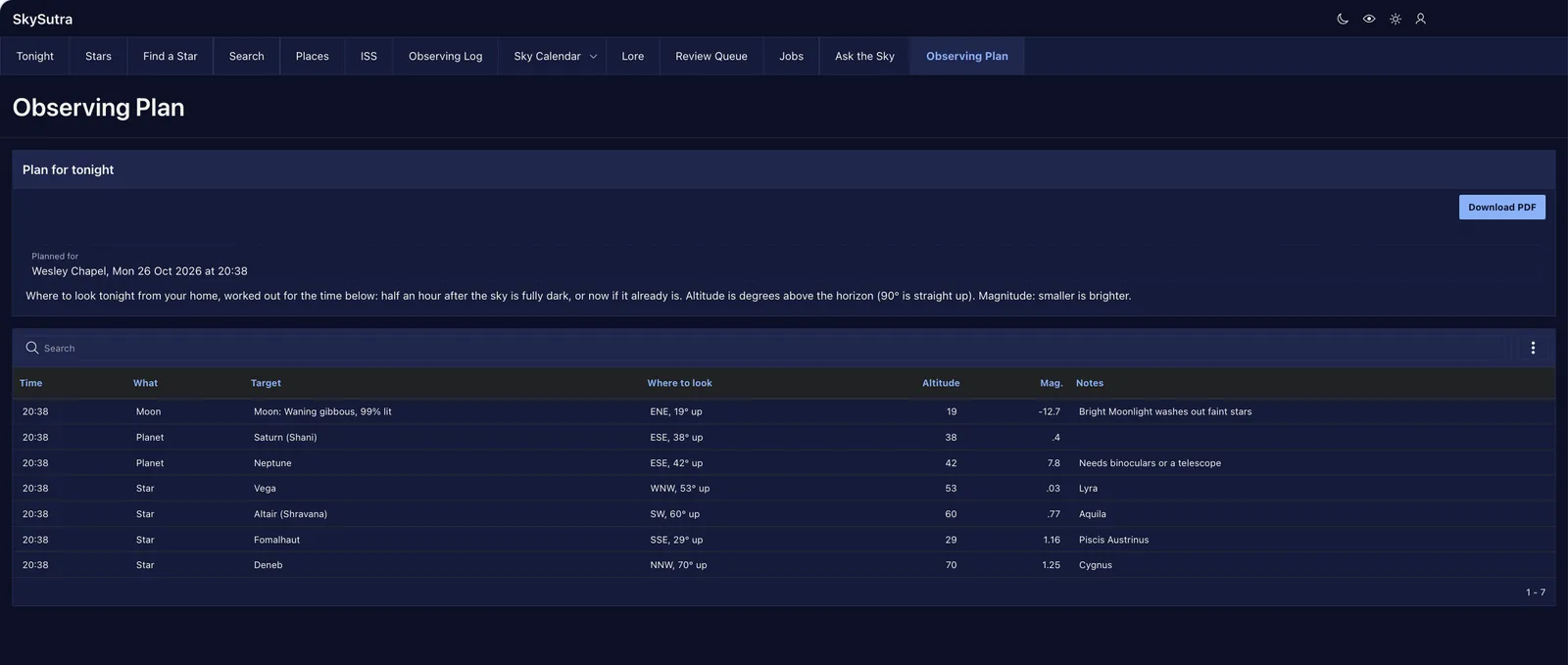
What to look at
SS_OBSERVING_PLAN_V has one row for each thing worth looking at tonight from your home. Positions are worked out for one moment, ss_plan.plan_at: half an hour after full darkness begins, or now if it's already dark.
| What | Comes from | Listed when |
|---|---|---|
| The Moon, its phase and how much is lit | SS_SUN_MOON (Part 3) |
it's more than 5° up |
| Each planet, with its magnitude | SS_PLANETS |
it's more than 5° up |
| The brightest stars (magnitude 1.5 or brighter) | SS_COORD.STAR_ALTITUDE |
they're more than 15° up |
| Visible ISS passes tonight | SS_ISS_PASSES (Part 4) |
always |
| Tonight's events | SS_SKY_EVENTS (Part 9) |
always |
For Wesley Chapel on Oct 25, 2026 at 20:39, it lists:
| Time | What | Target | Where to look | Mag. |
|---|---|---|---|---|
| 20:39 | Moon | Moon: Full Moon, 100% lit | E, 28° up | −12.7 |
| 20:39 | Planet | Saturn (Shani) | ESE, 37° up | 0.3 |
| 20:39 | Planet | Neptune | ESE, 42° up | 7.8 |
| 20:39 | Star | Vega | WNW, 53° up | 0.03 |
| 20:39 | Star | Altair (Shravana) | SW, 60° up | 0.77 |
| 20:39 | Star | Fomalhaut | SSE, 28° up | 1.16 |
| 20:39 | Star | Deneb | NNW, 71° up | 1.25 |
SS_SUN_MOON gives the Moon's position as one procedure with two OUT parameters, which SQL can't call. SS_PLAN wraps it in two small functions, moon_altitude and moon_azimuth.
Two ways to a PDF
APEX makes PDFs itself, with no print server:
- The Interactive Report's own download. Actions › Download › PDF gives the report as you've filtered and sorted it. Nothing to build: the report's Download attribute lists the formats,
CSV:HTML:XLSX:PDF. APEX_DATA_EXPORT, for a PDF you design: your own title, header, footer and column names.
procedure download_pdf is
    l_ctx   apex_exec.t_context;
    l_exp   apex_data_export.t_export;
    l_title varchar2(400);
begin
    select 'Observing plan: ' || max(place) || ', ' || max(plan_for)
      into l_title
      from ss_observing_plan_v;

    l_ctx := apex_exec.open_query_context(
                 p_location  => apex_exec.c_location_local_db,
                 p_sql_query => 'select at_local as "Time", kind as "What", target as "Target",
                                        where_to_look as "Where", magnitude as "Mag.", notes as "Notes"
                                   from ss_observing_plan_v
                                  order by sort_at, seq, magnitude');
    l_exp := apex_data_export.export(
                 p_context      => l_ctx,
                 p_format       => apex_data_export.c_format_pdf,
                 p_file_name    => 'skysutra-observing-plan',
                 p_print_config => apex_data_export.get_print_config(
                                       p_orientation  => apex_data_export.c_orientation_landscape,
                                       p_page_header  => l_title,
                                       p_page_footer  => 'SkySutra · times are local · altitudes in degrees above the horizon',
                                       p_border_width => 0.5));
    apex_exec.close(l_ctx);
    apex_data_export.download(p_export => l_exp);   -- sends the file and stops the page
end download_pdf;
APEX_EXEC runs the query and APEX_DATA_EXPORT writes it out, in PDF, XLSX, CSV, HTML, JSON or XML. download sends the file to the browser and ends the page request, so the page doesn't reload.
Build: the Observing Plan page
-
Create Page › Interactive Report: 90, Observing Plan, no form page, SQL query:
select at_local, kind, target, where_to_look, altitude, magnitude, notes, sort_at, seq
  from ss_observing_plan_v
 order by sort_at, seq, magnitude
Icon
fa-print, a new navigation entry. -
The region: title Tonight's plan; column headings Time, What, Target, Where to look, Altitude, Mag., Notes;
SORT_ATandSEQHidden Column (used for the order only). On Target, set Value Identifies Row to Yes: a screen reader then reads each row by its target (the Advisor checks this, Lesson 12.5). -
A Static Content region Plan for tonight above it: a sentence explaining the time, altitude and magnitude, and a Display Only item P90_PLAN_FOR ("Planned for"), set by a Before Header computation:
select max(place) || ', ' || max(plan_for) from ss_observing_plan_v -
A button DOWNLOAD_PDF, "Download PDF", hot, icon
fa-file-pdf-o, in the region's Next slot. -
A process Download the plan as a PDF, when DOWNLOAD_PDF is pressed:
ss_plan.download_pdf; -
Page › Advanced › Reload on Submit: Always. New pages default to Only for Success, which submits the page in the background and expects a page back, not a file. Leave it, and the button stops with "Downloads are not supported if the page attribute Reload on Submit is set to Only for Success".
Print it in landscape, and take a red torch.
Lesson 12.4 — On your phone
Outcome: SkySutra on your phone's home screen, opening like an app.
In Part 10, SkySutra became a Progressive Web App so it could send push notifications. Push works without installing. Now make it installable too.
Shared Components › Progressive Web App:
- Installable on
- Display Standalone: its own window, without the browser's address bar. (Fullscreen also hides the phone's status bar, which is too much for an app you check at night.)
- Theme colour and Background colour, Custom,
#0B1026: the night style's background (Lesson 5.1). The phone uses it for the splash screen and the bar at the top. - Short Name SkySutra: the label under the icon.
- App Description: "Tonight's sky over your home, in modern astronomy and the Indian tradition."
The icon is the one from Lesson 0.6. APEX makes every size a phone asks for.
Install it
- Android, Chrome: the menu shows Install app, or Add to Home screen.
- iPhone, Safari: Share › Add to Home Screen. (On an iPhone, push notifications only work once it's installed like this.)
- A computer, Chrome or Edge: an install button appears at the right of the address bar.
SkySutra then opens in its own window, with its name and icon in the app switcher.
Shortcuts need a decision
The same page has Shortcuts: entries on the icon's long-press menu, such as Tonight, Ask the Sky and Observing Plan. APEX says Rejoin Sessions must be on for them. A shortcut opens a page without a session in its URL, and Rejoin Sessions lets APEX find your existing session from its cookie. That's convenient, but it also lets any link into the app pick up your session, which is a door Oracle keeps shut by default. SkySutra leaves it shut. If you open it, set Rejoin Sessions to Enable for All Sessions under Security › Session Management in the Application Definition, and keep Session State Protection on (it is, by default) so a link can't set items it shouldn't.
Lesson 12.5 — Go-live
Outcome: a list of what changes when SkySutra has real users, and what's still to do.
SkySutra has run for the four people who built and tested it. Real stargazers bring real homes, real photos and real AI bills.
Who can sign in
| Now | For real |
|---|---|
| Oracle APEX accounts that you create by hand (Lesson 0.6) | People sign in with Google. Make the Google scheme from Lesson 0.6 current, and turn on its sign-up. Keep one APEX account for yourself as an administrator. |
| Roles assigned by you | The same: Administrator and Moderator stay hand-picked (Lesson 0.6) |
What people can see
- Places are private. A home's coordinates appear only to its owner. The map (Lesson 7.2), the API (Lesson 12.2) and the observations show only a place's name and Bortle value to everyone else. Check every new view against that.
- Public observations are moderated (Part 8): nothing reaches everyone until a moderator approves it. With real traffic, name more than one moderator, and look at the review queue every day.
- Photos. A phone photo carries the GPS position where it was taken in its EXIF data. Lesson 8.1's Image Upload item shrinks large photos in the browser, which drops EXIF; but a photo already smaller than 2,000 pixels is uploaded as it is, location and all. Strip EXIF on the server before a photo can go public.
What it costs
| Cost | Where it's set |
|---|---|
| AI answers (the Sky guide) | Workspace Utilities › Generative AI Services › Turnout AI › Maximum AI Tokens: a daily ceiling for the whole workspace |
| Embeddings | Only new and changed texts, nightly (Lesson 11.3): a few calls a day |
APEX_MAIL on apex.oracle.com has a daily limit; the weekly email (Lesson 10.4) is the big one. Send from an address you own. |
|
| Push | Free |
Gemini's free tier is for trying things. For real users, move the AI service to a paid key, or to OCI Generative AI.
What has to be watched
- The Jobs page (Lesson 10.2) each morning: the nightly chain, the alerts, the embeddings. A FAILED row says what broke.
- Automation logs: Shared Components › Automations › Nightly sky › Log.
- Activity: Administration › Monitor Activity shows page views, slow pages and errors by page.
Before the switch
- Run the Advisor: App Builder › SkySutra › Utilities › Advisor. On apex.oracle.com, checking every page at once, or even seven, timed out (HTTP 500), so check one or two pages at a time. For page 90 it found three things:
- Page is not protected by an authorization scheme. It needs sign-in, and every row is the signed-in person's own; that's enough. Pages with data other people mustn't see (Jobs, Review queue, Lore Panel) have schemes.
- The Interactive Report region does not have a column with Value Identifies Row. Fixed: Target.
- The Theme Style Night has not been tested for accessibility. Night is SkySutra's own style (Lesson 5.1). Check its contrast (light text on
#0B1026passes WCAG AA by a wide margin), then set Accessibility Tested on the style, or say why you haven't.
- Debugging off: Application Definition › Properties › Debugging No, so
&DEBUG.can't be switched on by a URL. - Build options: anything still marked Commented Out stays out of the export.
- Clean up the build's leftovers: the spike app, unused Vector Providers, invalid objects (
select object_name, object_type from user_objects where status = 'INVALID'). - Export it: Export / Import › Export, with Supporting Objects so the SQL scripts travel with the app. Keep the export in source control, as this course's files are.
- A privacy note and terms: what SkySutra stores, why, and how to delete your account. A static page linked from the footer is enough to start.
What SkySutra is, and isn't
From Part 1, SkySutra has kept one rule: it shows what's in the sky and the stories people tell about it, with their sources, and it never tells anyone what the sky means for them. Every part since has kept it. The lore panels have sources. The tithis are computed and checked against published panchangs. The AI guide is told to refuse predictions, and Lesson 11.6 tests that it does. Going live doesn't change the rule. It makes the rule matter more.
Checkpoint
SkySutra now shares its public observations and calendar through a read-only API, prints tonight's plan, installs on a phone, and has a list for going live.
Test it
- SQL Commands:
select json_serialize(data pretty) from ss_public_observations_dvshows only published public observations, with photos and comments nested. - Run Lesson 12.2's Try it block: 200, 200, 404, 200.
- Observing Plan: tonight's targets for your home; Download PDF gives a landscape PDF with the title "Observing plan: …". Compare it with Actions › Download › PDF.
- On your phone, open SkySutra and install it. It opens in its own window, dark blue at the top.
- Utilities › Advisor on pages 60–90: fix or explain every finding.
Files
| File | Used in |
|---|---|
skysutra_share.sql |
12.1–12.3 (SS_PUBLIC_OBSERVATIONS_DV, SS_API_EVENTS_V, module skysutra.v1, SS_PLAN, SS_OBSERVING_PLAN_V) |
skysutra-app-course.sql |
The finished app, all twelve parts (see below) |
IMPORT.txt |
How to install the finished app, the same steps as below |
The finished app
There's one export for the whole course: SkySutra as it stands at the end of this part. Compare it with yours, or install it next to yours to see how a page was put together. The export doesn't make the tables or packages, so it takes a few steps:
- Run the scripts that don't need the catalog, in this order:
skysutra_schema.sql,skysutra_seed.sql,skysutra_auth.sql,skysutra_math.sql,skysutra_planets.sql,skysutra_rise_set.sql,skysutra_iss.sql,skysutra_iss_tests.sql,skysutra_live.sql,skysutra_tonight.sql,skysutra_chart.sql,skysutra_explore.sql,skysutra_places.sql,skysutra_observations.sql,skysutra_calendar.sql,skysutra_signs.sql,skysutra_jobs.sql,skysutra_share.sql. The home page reads views and packages from these, so the app can't open until they're in. - App Builder › Import
skysutra-app-course.sql, with Auto Assign New Application ID so it never replaces an app of yours. It asks for two keys while it installs: your Gemini key for Credentials for turnout ai, and your api.nasa.gov key (orDEMO_KEY) for Credentials for NASA picture of the day. - Load the catalog: first make yourself an administrator: Shared Components › Application Access Control › Add User Role Assignment, your own user name, Administrator (Lesson 2.6). Roles come across in an export; the people in them don't, and page 20 is for administrators only. Next, in SQL Commands, make the error table the Constellation Lines load writes its bad rows to (Lesson 2.4):
begin dbms_errlog.create_error_log('SS_CONSTELLATION_LINES'); end;. Then run the app, open page 20 (aliasload) and load the four CSVs from Part 2 in this order:constellations.csv,bright_stars.csv,constellation_lines.csv,nakshatra_stars.csv. - Run the two scripts that need the catalog:
skysutra_lore.sqlandskysutra_ask.sql. Their stories are tied to stars, constellations and nakshatras. - Set what an export can't carry:
- Change the workflow owner (Observation Review) and the task's business administrator (Review an Observation) from
ADMINto your own user name. - Assign the Moderator role to someone, the same way as Administrator in step 3.
- Regenerate the push credentials (Shared Components › Progressive Web App). Keys never leave a workspace.
- For Google sign-in, put your own client ID and secret into the Google sign-in credential (Lesson 0.6). Until then the app signs in with Oracle APEX Accounts.
- Nightly sky, Sky alerts and Weekly sky email arrive Active. If your own SkySutra is in the same workspace, disable them in one of the two, or both will run.
- Change the workflow owner (Observation Review) and the task's business administrator (Review an Observation) from
- Fill it: Jobs › Run Now, then in SQL Commands
begin ss_ask.refresh_star_texts; ss_ask.refresh_embeddings; end;for Ask the sky.
Exercises
- Add
GET /skysutra/v1/stars/:namefromSS_STARS_V. What should it say about the star's altitude, which depends on where the caller is? - Build a Community page on the duality view: in Create Page, the Data Source list now offers Duality View.
- Let the Observing Plan take a time: an item P90_AT with a time picker, and
plan_atused only when it's empty. - Write
skysutra.v2withobservedAtin UTC and the place's distance from a given point (?lat=&lon=), with v1 still running. - Stretch: let the API accept new observations from a phone app with OAuth2, as Turnout Part 14 does for check-ins. Should the app write through the duality view, or through
SS_OBS_API? Why?
Review questions
Try each one before you open it. The graded quiz is at the end of the page.
1What does a duality view store?
Nothing: it builds each document from the tables when it's read
2Why is SS_PUBLIC_OBSERVATIONS_DV read-only?
Observations change only through SS_OBS_API, which runs the review workflow and checks the owner
3What does a duality view's WHERE clause need?
WITH CHECK OPTION
4Why doesn't the public document include the place's coordinates?
Most places are homes
5What is the etag in _metadata for?
It changes when anything in the document changes, so a client can tell whether its copy is current
6Why do photos have their own URL instead of being in the document?
They're large; a media handler sends one with its content type when it's asked for
7Why does the API give times in UTC?
It can't know the caller's time zone
8When does an API need a new version?
When a field is renamed, removed or changes meaning; adding fields doesn't
9Name two ways APEX makes a PDF without a print server.
The Interactive Report's PDF download, and APEX_DATA_EXPORT
10Why does SkySutra leave Rejoin Sessions off, even though PWA shortcuts need it?
It lets any link into the app pick up an existing session; the shortcuts aren't worth that
Downloads for Part 12
Everything this part uses. The SQL files are plain text: open one in any editor before you run it.
- Part 12 kitskysutra-part-12.zipEvery file above in one zip, with a README
- Share itskysutra_share.sqlLessons 12.1 to 12.3: the duality view, the API, the observing plan
- The finished appskysutra-app-course.sqlThe whole app at the end of Part 12, to import next to yours
- How to install itIMPORT.txtScripts, import, and what to set afterwards
Part 12 quiz
5 questions. Get 4 right to pass. You can retake it as often as you like.